
The minecraft 3d in Scratch
Sorter
minecraft 3d
Minecraft © Mojang AB
The popular minecraft 3d in Scratch
#01 Realistic 3D Minecraft
- 63,410
- 54,059
- 4,837,675
- ©
- 2015.3.18

I wrote at the beginning that Scratch's Micra is 2D. That was a lie (snip)
Various people have made realistic 3D Micras, including Finally_Cool, who is famous for his Mario Kart He is also famous for his scratch work.
Both Maricar and Minecraft are based on a 3D programming technique called "raycasting," so I see why both are high quality. You can experience a high level of proficiency in the skill.
You don't need to understand English to enjoy it.
This is not a game that you will play continuously as a micro game. But it is a work that satisfies the desire of "I want to enjoy Micra in a realistic and scratchy way! It is a work that satisfies the desire to "enjoy Micra in a realistic and scratchy way!
Wow, scratch microscopes can be sculpted to this level!
We hope you will experience the impression of how well Scratch's Micra can be sculpted.
Supplementation
Some of the fiercest people have created saveable versions using the code from this project. I'll post that one too!
The save method is a bit complicated. Once you start the game, press the P key and choose "Return to Home Screen" once. Then click on "Feathers and Books" and then look inside the project to download the file.
Hints on how to create
The author gave us the project he referred to for the terrain generation process. Check it out if you are interested in creating a realistic microcosm.
#02 3D Minecraft
- 26,915
- 23,056
- 2,275,027
- ©
- 2014.4.13
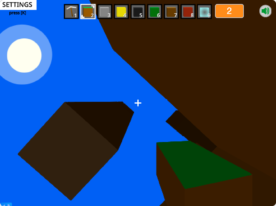
This is another three-dimensional Minecraft. The canine is with you from the beginning and it's soothing.
The canine is a shadow-like being, but it can also change color.
It will soon turn into night, but if you press the button "Setting" in the upper left corner (or press the K key), there is a sun icon that you can click to make it daytime to make it easier to play.
I also feel you will enjoy it more if you change the way you turn around from keyboard to mouse.
I tried to collect soil and build it, but I was able to build it quite authentically.
How to use
| Action | Corresponding key |
| Move | WASD key |
| Jump | Spacebar |
| Turn around | Arrow keys (can be changed to mouse) |
| Select item for slot | Number keys 1-9 |
| Mine | Select pickaxe then M key |
| Build | Select non-pickaxe then M key |
What you can set up
- You can choose whether the blocks are wired
- You can choose how many blocks you see
- You can choose whether to turn around with the mouse or the keyboard
- You can choose the color of the canine
- You can choose whether you want water
#03 MINECRAFT 3D Version 2.8
- 3,489
- 3,012
- 542,248
- ©
- 2013.11.24
You move around with WASD, use E to find stuff, and left-click to attack. You can also craft by holding down the C key. In the updates, they've done stuff like removing Herobrine (or did they?), and added crafting features, new trees, zombies, armor, an XP bar, hearts, food, and even Minecraft music. Plus, you can mine ores, chop wood, and use an axe now. The creator is totally waiting for everyone's opinions and ideas. Sounds fun, right?
#04 This is a mind-blowing 3D Minecraft version. its definitely worth a look!
- 2,364
- 2,096
- 138,650
- ©
- 2023.4.29
How to play
| Action | Key |
|---|---|
| Moving on. | WASD key |
| Look around | Drag the mouse (left click to move) |
| Ascending. | Space bar |
| Descending. | Shift key or Z key |
| Zoom in | C key |
| Break a block | E key |
| Place a block | Q key |
I've introduced a few 3D Minecraft creations made in Scratch before, but I've never seen any as successful in achieving 3D as this one... It's absolutely astonishing! It's like a 'jaw-drop, wow' moment. I'm amazed that Scratch can handle such detailed 3D rendering! It's a mix of jealousy and deep respect.
Try running it on TurboWarp! If you're interested in either 3D or Minecraft, it's totally worth checking out!
Man, I was so surprised the moment I found it.

#06 Raytraced Minecraft (3D)
- 3,091
- 2,913
- 54,078
- ©
- 2023.6.28
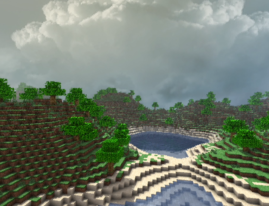
So, in this game, right, the focus is really on things like the screen's detail, menu design, and how Creative Mode works. You can have a blast building structures and taking cool screenshots. And guess what? They've used some serious math to replicate how light moves, just like in real life! Plus, they've got music and some parts from 'Minecraft,' and for creating 3D models, they've used this tool called 'Blender.' Oh, and the 3D engine? It even incorporates some codes from other Scratch users. Pretty awesome, huh?
#07 One of the best 3D Minecraft games
- 384
- 362
- 34,921
- ©
- 2021.4.17
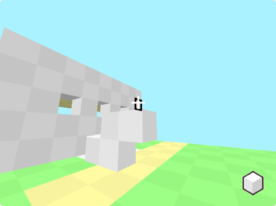
How to play
| Action | Key |
|---|---|
| Move | WASD keys |
| Rotate | Arrow keys |
| Break blocks | E/M keys |
| Place blocks | Q/K keys |
| Change block color | F/N keys |
| Jump | Spacebar |

It's rare to see such high-level 3D work, let alone in a Minecraft project. The creator is nakakouTV who is famous for his Mochi Mochi Slime games. No wonder his pen usage is so good.
Press Z key to undo blocks you placed or broke one step before.
#08 Added textures to Minecraft 3D!
- 1,296
- 1,232
- 26,424
- ©
- 2021.6.3
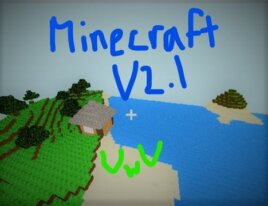
You can move your character using the "WASD" keys to play the game. Hit the spacebar when you want to jump. Just click with your mouse to place blocks or mine! Click on your inventory to select blocks and pickaxes. Press the "Z" key if you want to save your game progress. And when you want to change game settings, just move your mouse cursor to the top of the screen.

スクラッチで3Dゲームを作る方法
3Dマイクラのような3Dゲームを自分で作りたい方へ!